Mobile phone is a communication gadget that is very important to every person due to its usefulness and being handy. Its feature of sending and receiving messages is recently enhanced. It now sends simple and short business transaction texts to Ikonomikal Cloud ERP business software to automatically record, post and provide real time operation and financial reports. The advantage of text over the cloud is the former works, without internet and user's knowledge of computer, where data from remote areas are obtained.
The combination of SMS/ Text and Cloud technologies in Ikonomikal Cloud ERP overcomes the difficulty of gathering data in real time from remote areas without suffering from intermittent internet service to no internet at all but with continuous mobile phone communication. This innovation helps enterprises with multiple and remote offices/ branches/ companies/ locations having staffs using only simple mobile phone. An advantage to the owners who reside in the suburban city while their businesses are in the far-flung areas where mobile phone is the only fastest means of communication.
EXAMPLE:
TEXT FOR NORMAL SALES WITH DISCOUNT AND NOTES:
SALES INSERT
#r01 INSERT
#itemCode IC00001
#invQty 1
#uomCode BOX
#discType SNR
#discAmt 100
#notes sr.# 12345689
-----------------------------
Note: Types of “discType”:
REG - Regular
ESP - Especial
PWD – Persons With Disabilities
STD - Student Discount
SNR – Senior Discount
 |
| How it works |
 |
| Ikonomikal Texts Receiver Programs |
Ikonomikal Cloud ERP without human control triggers the below programs.
Text Receiver Program automatically
1. Receives texts through SMS Gateway
2. Day Ends the received texts and transfer them to Transaction programs
Transaction Programs automatically
3. Completes the information
4, Generates accounting entries
5. Posts the transactions
6. Sends posted transactions to General Ledger History
7. Updates the corresponding Subsidiary Ledgers
The best feature is Ikonomikal automatically closes accounting entries to close to Income and Expense then to Retained Earnings. This means Ikonomikal provides instant complete Financial Reports any time and not to wait for month end and year end closing.
Scheduler Program automatically
8. Prepares reports on schedule, and
9. Sends reports on schedule as well to user inbox or through text to the mobile phone.
The good point is there is no human intervention in Ikonomikal Cloud ERP base on the above facts should anyone shall observe.
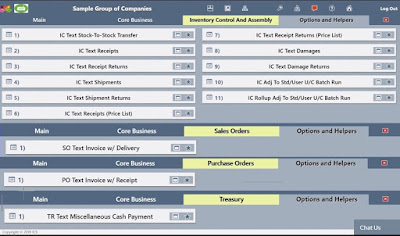
Text Receiver Programs of Ikonomikal Cloud ERP are group in the below Modules. These are only the start and definitely the clients will be requesting for more.
Inventory Control and Assembly
1. IC Text Stock-To-Stock Transfer
2. IC Text Receipts
3. IC Text Receipt Returns
4. IC Text Shipments
5. IC Text Shipment Returns
6. IC Text Receipts (Price List)
7. IC Text Receipts Returns (Price List)
8. IC Text Damages
9. IC Text Damages Returns
10. IC Adj To Std/User U/C Batch Run
11. IC Rollup Adj To Std/User U/C Batch Run
Sales Order
SO Text Invoice w/ Receipt
Note: With automatic assembly cost accounting of the packaging materials and labor of the sold finished goods of the food chain industry.
Purchase Order
PO Text Invoice w/Receipt
Treasury
TR Text Miscellaneous Cash Payment
How to go to Text Receiver programs of Inventory Control and Assembly Modules of Ikonomikal Cloud ERP
Click Program>Main>Core Business>Inventory Control
and Assembly>Options and Helpers
 |
| Bigger image |
Click Favorites to show Shortcuts. This is only possible if
the program was previously selected to show in the shortcuts for quick access.
IC Text Stock-To-Stock Transfer
Text Transferring Inventory From Commissary to Driver
People Involved: Commissary Personnel to Driver #1
Steps
1. Select the number of
Your Company Ikonomikal SMS Gateway
+63 9XX XXXX (example only)
While your number must be registered in Ikonomikal as a User
2. Open the “Messages” App (or an equivalent) from your
mobile phone.
3. Create a new Text Message and enter the gateway number
on the recipient box (or equivalent)
4. Enter the message:
Format:
STOCKTRANSFER
INSERT
#docDte
<THE DATE OF TRANSACTION IN YYYYMMDD FORMAT>
#r01
INSERT
#itemCode
< THE ITEM CODE >
#toWH
<THE WAREHOUSE ID TO TRANSFER TO (USUALLY THE DRIVER WAREHOUSE)>
#invQty
<QUANTITY TO TRANSFER, MUST BE A NUMBER>
#uomCode
<THE UNIT OF MEASURE. Ex. KG,PIECE, GRAMS, ETC>
docDte is ….the date of transaction (will use the current
date when removed or left blank/zero(0)).
itemCode is ….the item code.
toWH is ….the warehouse code to transfer to. In
ikonomikal, drivers are also warehouses.
invQty is ….the quantity to transfer.
uomCode is ….the unit of measure (ex. KG, PIECE, BOX).
Text Example of Stock-To-Stock Transfer:
STOCKTRANSFER INSERT
#docDte 20181217
#r01 INSERT
#itemCode IC0003U
#toWH 0400D1
#invQty 5.5
#uomCode TRAY
#r01 INSERT
#itemCode IC0009U
#toWH 0400D1
#invQty 370
#uomCode TRAY
#r01 INSERT
#itemCode IC0001U
#toWH 0400D1
#invQty 94
#uomCode TRAY
#r01 INSERT
#itemCode IC0020
#toWH 0400D1
#invQty 3,007
#uomCode PC
Note:
4 items were entered the’ IC0009U, IC0003U, IC0001U and IC0020 to transfer from commissary stocks to the driver (ex. 0400D1 is Driver 1 warehous) who will deliver to the outlets. The “#r01 INSERT” indicates a new
set of items to be transferred. Only items with quantities are allowed.
5. Press send and wait for the confirmation.
The confirmation should almost resemble the following
message:
a. The INSERT operation for STOCKTRANSFER was received
and for validation!
b. The INSERT operation for STOCKTRANSFER was queued for
processing under transaction id xxxx!
c. The INSERT operation for STOCKTRANSFER under
transaction id xxxx was successful!
The Text Receiver Program
 |
| Text Receiver Program of Ikonomikal |
Printed Report of Received Text
 |
| Text received in Ikonomikal |
The automatic Day End on the Text Receiver Program automatically transfers the text and completes the information in the appropriate program such as below. This program also automatically posts the transaction.
Printed Report of the transaction
Text Receiving Inventory
From Driver To Outlet
People Involved: Store
Outlet Personnel and Driver
Steps
1. Select the number of
Your Company Ikonomikal SMS Gateway
+63 9XX XXXX (example only)
While your number must be registered in Ikonomikal as a User
2. Open the “Messages” App (or an equivalent) from your
mobile phone.
3. Create a new Text Message and enter the gateway number
on the recipient box (or equivalent)
4. Enter the message:
Format:
STOCKTRANSFER
INSERT
#docDte
<THE DATE OF TRANSACTION IN YYYYMMDD FORMAT>
#r01
INSERT
#itemCode
< THE ITEM CODE >
#toWH
<THE WAREHOUSE ID TO TRANSFER TO (USUALLY THE OUTLET WAREHOUSE)>
#invQty
<QUANTITY TO TRANSFER, MUST BE A NUMBER>
#uomCode
<THE UNIT OF MEASURE. Ex. KG,PIECE, GRAMS, ETC>
docDte is ….the date of transaction (will use the current
date when removed or left blank/zero(0)).
itemCode is ….the item code.
toWH is ….the warehouse code to transfer to. In
ikonomikal outlets are also warehouses.
invQty is ….the quantity to transfer.
uomCode is ….the unit of measure (ex. KG, PIECE, BOX).
Text Example of Stock-To-Stock Transfer:
STOCKTRANSFER INSERT
#docDte 20181217
#r01 INSERT
#itemCode IC0003U
#fromWH 0400D1
#toWH 0401
#invQty 5.5
#uomCode TRAY
#r01 INSERT
#itemCode IC0009U
#fromWH 0400D1
#toWH 0401
#invQty 370
#uomCode TRAY
#r01 INSERT
#itemCode IC0001U
#fromWH 0400D1
#toWH 0401
#invQty 94
#uomCode TRAY
#r01 INSERT
#itemCode IC0020
#fromWH 0400D1
#toWH 0401
#invQty 3,007
#uomCode PC
5. Press send and wait for the confirmation.
The confirmation should almost resemble the following
message:
a. The INSERT operation for STOCKTRANSFER was received
and for validation!
b. The INSERT operation for STOCKTRANSFER was queued for
processing under transaction id xxxx!
c. The INSERT operation for STOCKTRANSFER under
transaction id xxxx was successful!
IC Text Receipts
Receiving Inventory
To Increase Commissary Stocks
People Involved: Commissary Personnel
Format:
STOCKRECEIPT INSERT
#docDte <THE DATE OF TRANSACTION IN YYYYMMDD
FORMAT>
#r01 INSERT
#itemCode < THE ITEM CODE >
#rcpQty <QUANTITY TO RECEIVE, MUST BE A NUMBER>
#uomCode <THE UNIT OF MEASURE. Ex. KG,PIECE, GRAMS,
ETC>
IC Text Text Receipt Example:
STOCKRECEIPT INSERT
#docDte 20181107
#r01 INSERT
#itemCode IC0001U
#rcpQty 50
#uomCode TRAY
IC Text Damages
Spoilage Inventory
Format:
SPOILAGE
INSERT
#docDte
<THE DATE OF TRANSACTION IN YYYYMMDD FORMAT>
#r01
INSERT
#itemCode
< THE ITEM CODE >
#dmgQty
<SPOILAGE QUANTITY, MUST BE A NUMBER>
#uomCode
<THE UNIT OF MEASURE. Ex. KG,PIECE, GRAMS, ETC>
IC Text Damages Example:
SPOILAGE INSERT
#docDte 20181021
#r01 INSERT
#itemCode IC0001
#dmgQty 100
#uomCode BOX
SO Text Invoice w/ Receipt
Recording Of Sales
People Involved: Outlet personnel
Format:
SALES
INSERT
#docDte
<THE DATE OF TRANSACTION IN YYYYMMDD FORMAT>
#r01
INSERT
#itemCode
< THE ITEM CODE >
#invQty
<QUANTITY TO RECORD AS SALES, MUST BE A NUMBER>
#uomCode
<THE UNIT OF MEASURE. Ex. KG,PIECE, GRAMS, ETC>
docDte is ….the date of transaction (will use the current date
when removed or left blank/zero(0)).
itemCode is …. the item code.
invQty is ….the quantity to record as sales.
uomCode is ….the unit of measure (ex. KG, PIECE, BX).
SO Text Invoice w/ Receipt Example:
SALES INSERT
#docDte 20181021
#r01 INSERT
#itemCode IC0001
#invQty 50
#uomCode BX
Other Formats of Recording Of Sales
Format:
SALES
INSERT
#r01
INSERT
#itemCode
< THE ITEM CODE >
#invQty
<QUANTITY TO RECORD AS SALES, MUST BE A NUMBER>
#uomCode
<UNIT OF MEASURE>
#discType <TYPE OF DISCOUNT, ex. REG, ESP,PWD, and STD>
#discAmt <DISCOUNT AMOUNT, MUST BE A NUMBER>
#notes <ANY NOTES REFERENCE, OPTIONAL>
#saleType <SALE TYPE EITHER IT’S A SALE, FREETASTE OR REPRESENTATION>
Types of
“discType”:
· REG - regular
· ESP - Especial
· PWD – Persons With Disabilities
· STD – Student Discount
· SNR – Senior Discount
Take note that you don’t have to include
the #discType, #discAmt, and #notes because they are all optional. But if you
have to, this is how it would look like:
FOR
NORMAL SALES WITH DISCOUNT AND NOTES:
SALES INSERT
#r01 INSERT
#itemCode IC00001
#invQty 1
#uomCode BOX
#discType SNR
#discAmt 100
#notes sr.# 12345689
FOR
NORMAL SALES WITH NOTES ONLY:
SALES INSERT
#r01 INSERT
#itemCode IC00001
#invQty 1
#uomCode BOX
#notes received 28.2.2019
FOR
FREETASTE WITH DISCOUNT AND NOTES:
SALES INSERT
#r01 INSERT
#itemCode IC00001
#invQty 1
#uomCode BOX
#discType SNR
#discAmt 100
#notes sr.# 12345689
#saleType C007
FOR
REPRESENTATION WITH DISCOUNT AND NOTES:
SALES INSERT
#r01 INSERT
#itemCode IC00001
#invQty 1
#uomCode BOX
#discType SNR
#discAmt 100
#notes sr.# 12345689
#saleType C008
Recording Of
Expenses
Format:
EXPENSES
INSERT
#r01
INSERT
#itemCode
< THE ITEM CODE >
#invQty
<QUANTITY TO RECORD AS SALES, MUST BE A NUMBER>
#uPrc
<UNIT COST TO RECEIVE, MUST BE A NUMBER>
#uomCode
<UNIT OF MEASURE>
#discType <TYPE OF DISCOUNT, ex. REG, ESP,PWD, and STD>
#discAmt <DISCOUNT AMOUNT, MUST BE A NUMBER>
#notes
<ANY NOTES REFERENCE, OPTIONAL>
Types of
“discType”:
· REG - regular
· ESP - Especial
· PWD – Persons With Disabilities
· STD – Student Discount
· SNR – Senior Discount
Take note that you don’t have to include
the #discType, #discAmt, and #notes because they are all optional. But if you
have to, this is how it would look like:
FOR
NORMAL EXPENSES WITH DISCOUNT AND NOTES:
EXPENSES INSERT
#r01 INSERT
#itemCode IC00001
#invQty 1
#uPrc 28.8
#uomCode BOX
#discType SNR
#discAmt 100
#notes sr.# 12345689
FOR NORMAL EXPENSES
WITH NOTES ONLY:
EXPENSES INSERT
#r01 INSERT
#itemCode IC00001
#invQty 1
#uPrc 28.8
#uomCode BOX
#notes sr.# 12345689
Recording Of Expenses (w/ Advances)
SMS/Text Format from Ordinary Simple Mobile Phone:
EXPENSES INSERT
#r01 INSERT
#itemCode < THE ITEM CODE >
#invQty <QUANTITY TO RECORD AS SALES, MUST BE A NUMBER>
#uPrc <UNIT COST TO RECEIVE, MUST BE A NUMBER>
#uomCode <UNIT OF MEASURE>
#discType <TYPE OF DISCOUNT, ex. REG, ESP,PWD, and STD>
#discAmt <DISCOUNT AMOUNT, MUST BE A NUMBER>
#notes <ANY NOTES REFERENCE, OPTIONAL>
#advType <TYPE OF ADVANCES, ex. PER and BUS>
#empCode <EMPLOYEE CODE, ex. E001 (full list can be found at HR Employe Profile “Employee ID”)>
Types of “advTyp”:
· PER - PERSONAL
· BUS - BUSINESS
The itemCode for Advances is XA1220 and the uomCode is EA. Take note that you don’t have to include the #advType, and #empCode because they are all optional. But if you have to, this is how it would look like:
FOR NORMAL EXPENSES WITH ADVANCES:
FOR NORMAL EXPENSES WITH ADVANCES:
EXPENSES INSERT
#r01 INSERT
#itemCode XA1220
#invQty 1
#uPrc 300
#uomCode EA
#advType PER
#empCode E001
Related blog:
CONSIGNMENT IN CLOUD & SMS TECHNOLOGIES
END OF BLOG
------------------------------------------------------------------------------------------
iKonomikal Cloud Services
Department of Trade and Industry Cert#: 04929944
Mayor’s Permit: BCN 1914-56
TIN: 224 089 131 VAT Registered
TR iKonomikal Consultants
Department of Trade and Industry Cert#: 04929961
Mayor’s Permit: BCN 1914-56-01
TIN: 224 089 131 VAT Registered
Ground Floor, TG Rolluqui Building
117 Burgos Street Corner Regalia Street
Brgy. Bagong Silang, Poblacion, Santa Cruz
Marinduque, 4902, Region 4B, Philippines
M: +63 918 229 5934 (Smart)
M: +63 917 813 4905 (Globe)
T: +63 42 704 5312 (PLDT)
------------------------------------------------------------------------------------------
Please click also the following to know more about Ikonomikal
Suggested modifications, customizations and developments with general industry use is FREE OF COST. 24/7 online Technical Sup